Support My BlogSupport My Blog
Showing posts with label Aircraft. Show all posts

P3D Fusion – Bring FSX Gold Edition Aircraft to Prepar3D


P3D Fusion by Rikoooo – FSX Gold Edition aircraft collection for Prepar3D

Expand Your Prepar3D Aircraft Collection

Looking to add more classic aircraft to your Prepar3D hangar? P3D Fusion, a package assembled by Rikoooo, brings a selection of default aircraft and helicopters from Microsoft Flight Simulator X Gold Edition into the Prepar3D environment.

Designed for 64-bit Prepar3D, this package offers a convenient way to enjoy familiar aircraft from FSX Gold Edition without searching for each aircraft individually.

What Is P3D Fusion?

P3D Fusion is a collection based on the default aircraft included in FSX Gold Edition. According to Rikoooo, the package contains 21 aircraft and two helicopters, with virtual cockpits.

The aircraft were adapted and tested for compatibility with the supported Prepar3D versions.

Aircraft Included

The collection features a varied selection of aircraft, including:

  • Airbus A321

  • Boeing 737-800

  • Boeing 747-400

  • Boeing F/A-18 Hornet

  • Bombardier CRJ-700

  • Bombardier Learjet LJ-45

  • Beechcraft Baron 58

  • Beechcraft King Air 350

  • Cessna 172S Skyhawk

  • Cessna 208B Grand Caravan

  • Douglas DC-3

  • de Havilland DHC-2 Beaver

  • North American P-51D

  • Piper J-3 Cub

  • Robinson R-22 Beta II

Other aircraft in the collection include gliders, ultralights, general aviation aircraft and additional classic favorites.

Note: The AgustaWestland EH101 was removed because of compatibility issues.

Key Features

  • A collection based on FSX Gold Edition default aircraft

  • 21 aircraft and two helicopters, according to the package description

  • 3D virtual cockpits

  • Aircraft adapted for 64-bit Prepar3D

  • Automatic installation through Rikoooo's installer

Compatibility and Technical Information

  • Package Version: 1.0

  • File Size: Approximately 520 MB

  • Format: Native FSX / P3D format

  • Installer: Rikoooo Installer 10.5

  • License: Donationware

  • Simulator: Prepar3D

Check the current Rikoooo compatibility information before installation, especially if you are using a newer Prepar3D release.

How to Get P3D Fusion

P3D Fusion is presented on Rikoooo as a thank-you gift for users who make a donation. The product information page does not provide a direct download file.

Visit the official page for package details and access information:

Official Page:

Final Thoughts

P3D Fusion is an interesting option for Prepar3D users who miss the familiar aircraft from FSX Gold Edition. Instead of collecting individual aircraft add-ons, users can explore a broad selection of classic planes and helicopters in one package.

For virtual pilots who enjoy variety in their hangar, P3D Fusion is worth checking out.

Disclaimer: This article is an informational overview. Please refer to Rikoooo for the latest availability, installation instructions and compatibility details.

Boeing 727-100 MegaPack for FSX and P3D – Free Download


Boeing 727-100 classic three-engine passenger and cargo aircraft for FSX and Prepar3D

Boeing 727-100 MegaPack for FSX and P3D – 10 Aircraft Models and 32 HD Liveries

Are you a fan of classic three-engine passenger jets? The Boeing 727-100 MegaPack for FSX and Prepar3D is a freeware aircraft collection that brings the golden age of commercial aviation to your flight simulator.

This comprehensive package includes 10 Boeing 727-100 models, combining passenger and cargo configurations, a 3D virtual cockpit, 32 high-definition liveries, custom sounds, and a variety of ground-service features.

Whether you enjoy recreating historical airline operations or flying classic jetliners, this MegaPack offers plenty to explore.

✈️ Discover the Boeing 727-100

The Boeing 727 was one of the most recognizable commercial aircraft of the jet age. Its distinctive three-engine design, with all three engines mounted at the rear of the fuselage, helped give it a unique appearance.

The 727-100 was the original production version of the aircraft family. It served airlines around the world and became well known for operating short- and medium-haul routes.

For flight simulation enthusiasts, the Boeing 727 provides a different experience from modern airliners. Its classic cockpit environment and traditional jetliner design make it an appealing choice for historical airline flights.

This MegaPack allows you to explore the aircraft in both passenger and cargo configurations.

πŸ› ️ What's Included in the Boeing 727-100 MegaPack?

1. Ten Aircraft Models

The package contains eight passenger-version models and two cargo-version models created by TDS (Tenkuu Developers Studio).

This selection gives you different configurations to explore without needing to download each aircraft separately.

Passenger models are suitable for simulated airline operations, while cargo configurations offer an alternative for virtual freight flights.

2. Thirty-Two HD Liveries

The MegaPack includes 32 high-definition liveries representing a variety of airline, cargo, and special aircraft appearances.

The liveries include classic airline designs and cargo-related options, making the collection useful for enthusiasts who enjoy recreating different eras of aviation.

The official package listing includes liveries associated with airlines and operators such as:

  • Eastern

  • TWA

  • Pan Am

  • TAP

  • Avianca

  • United Airlines

  • Mexicana

  • Lufthansa

  • Braniff

  • Sabena

  • World Airways

  • UPS-related cargo liveries

The complete selection includes additional liveries and special schemes. Check the official download page for the full list.

3. Three-Dimensional Virtual Cockpit

The package features the Boeing 727 virtual cockpit by Thomas Ruth.

The 3D cockpit lets you explore the aircraft from the pilot's perspective and enjoy a classic flight deck rather than a modern glass-cockpit environment.

For simmers who appreciate traditional aircraft instrumentation, this is one of the package's key attractions.

4. Three Custom Sound Packs

The MegaPack includes three custom sound packs from the FS Audio Team.

Different sound configurations add variety to the aircraft collection and help enhance the experience of flying the classic three-engine jet.

Sound performance and behavior can vary depending on your simulator configuration.

5. Three Panel Configurations

The package includes three panel variants:

  • PAX: Passenger configuration

  • CARGO: Cargo configuration

  • CA: An additional configuration identified in the package

These options provide different panel setups for the included aircraft variants.

Consult the included documentation to understand the specific configuration and intended use of each panel.

6. Ground-Handling Equipment and Airport Services

The MegaPack includes several ground-service features and vehicles, including:

  • Passenger bus

  • Cargo vehicles

  • Passenger stairs

  • Refueling truck

  • Ground-handling gauge

These features help create a more complete airport environment around the aircraft.

They are especially useful for simmers who enjoy setting up realistic-looking departures and arrivals.

7. Additional Gauges and Effects

The package includes several additional gauges and effects to enhance the simulation experience:

  • GPWS

  • TCAS

  • V-Speed

  • CockpitSound

  • FlightDeck FX

  • Additional lighting and effects

The download also includes HTML reference and checklist files to help users learn about the aircraft and its operation.

Review the included documentation before your first flight, particularly if you are unfamiliar with classic Boeing 727 procedures.

πŸ’» Download Information and Compatibility

Before downloading, review the main package details.

  • Aircraft: Boeing 727-100 MegaPack

  • Developer of Aircraft Models: TDS (Tenkuu Developers Studio)

  • Virtual Cockpit: Thomas Ruth

  • Sound: FS Audio Team

  • Liveries: Juan C. Brizuela, also known as Johnny

  • Package Adaptation: Flanker256

  • Additional Fixes: Rikoooo

  • Aircraft Models: 10 total

  • Passenger Models: 8

  • Cargo Models: 2

  • HD Liveries: 32

  • File Size: Approximately 337 MB

  • License: Freeware

  • Format: Native FSX/P3D format

  • Installer: Rikoooo automatic installer, version 10.5

Supported Simulators

According to the official download page, the package supports:

  • Prepar3D v1

  • Prepar3D v2

  • Prepar3D v3

  • Prepar3D v4

  • Prepar3D v5

  • Microsoft Flight Simulator X

  • FSX Steam Edition

  • FSX Acceleration

  • FSX SP2

The package was originally intended for Prepar3D v4.5 and v5. Rikoooo subsequently adapted it for compatibility with older Prepar3D versions and FSX.

The automatic installer selects the appropriate files according to the simulator you choose.

Compatibility note: The listing covers FSX and Prepar3D. It does not confirm compatibility with Microsoft Flight Simulator 2020 or Microsoft Flight Simulator 2024.

πŸ›« Flight Ideas for the Boeing 727-100

Once installed, this MegaPack offers several ways to enjoy classic aviation.

Recreate Classic Airline Routes

Choose a passenger model and a historical airline livery, then plan a flight between major airports.

You can build your own route inspired by the period when the Boeing 727 was a familiar sight at airports around the world.

Explore Cargo Operations

Select one of the cargo models and create a virtual freight flight between regional or international airports.

Cargo operations offer a different atmosphere from conventional passenger services.

Build a Classic Airline Collection

Combine the Boeing 727-100 with other classic airliner add-ons to create a varied virtual fleet.

The collection's multiple models and liveries make it useful for enthusiasts who enjoy comparing different aircraft configurations.

Enjoy Ground Operations

Use the included ground-service features to add passenger buses, cargo vehicles, stairs, and refueling equipment to your airport setup.

These details can make screenshots and simulated turnaround scenes more engaging.

These are suggested ways to use the package; the listing does not indicate that dedicated missions or a career mode are included.

πŸ“₯ Download Boeing 727-100 MegaPack for FSX and P3D

Ready to bring this classic three-engine airliner into your virtual hangar?

Visit the official Rikoooo download page to review the screenshots, full livery list, installation details, and compatibility information.

πŸ‘‰ Official Download Page:
https://www.rikoooo.com/downloads/viewdownload/55/975

The package is listed as freeware. Read the installation instructions and included documentation before using the aircraft.

✈️ Related Posts

Boeing 727-200 TR 4K Classic Liveries Package V2 for FSX and P3D

Interested in another version of the classic Boeing 727? Explore the Boeing 727-200 repaint package for compatible versions of FSX and Prepar3D.

πŸ‘‰ Read the Full Article:
https://fsusa.blogspot.com/2026/11/boeing-727-200-tr-4k-classic-liveries.html

Boeing 747-400 LCF Dreamlifter for FSX and P3D

Discover the unusual Boeing 747 Dreamlifter, a specialized cargo aircraft designed to transport oversized aircraft components.

πŸ‘‰ Read the Full Article:
https://fsusa.blogspot.com/2026/11/boeing-747-400-lcf-dreamlifter-for-fsx.html

Airbus A320neo FlyByWire for MSFS 2020

Prefer modern airliners? Explore the FlyByWire A32NX community project for Microsoft Flight Simulator 2020.

πŸ‘‰ Read the Full Article:
https://fsusa.blogspot.com/2026/11/airbus-a320neo-flybywire-for-msfs-2020.html

πŸ“ Final Thoughts

The Boeing 727-100 MegaPack is a substantial freeware collection for fans of classic jetliners.

With 10 aircraft models, 32 HD liveries, three custom sound packs, a 3D virtual cockpit, multiple panel configurations, and ground-handling features, it offers a variety of options for virtual airline and cargo operations.

If you enjoy the distinctive design and atmosphere of classic three-engine airliners, this MegaPack is worth exploring in a compatible version of FSX or Prepar3D.

Which Boeing 727 livery would you choose for your next flight? Share your favorite classic airline in the comments!


Disclaimer: This article is for informational purposes. The add-on is provided by its respective creators and distributor. Please consult the official download page for current availability, license details, and compatibility information.

Douglas DC-9 Family Mega Pack for FSX and P3D – 5 Models and 81 Classic Liveries


Douglas DC-9 Family Mega Pack with classic airline liveries for FSX and Prepar3D


Are you a fan of classic commercial aviation? Looking for a vintage jet aircraft collection for Microsoft Flight Simulator X or Prepar3D?

The Douglas DC-9 Family Mega Pack for FSX and P3D is an exciting freeware add-on for flight simulation enthusiasts who want to experience the golden age of passenger aviation.

This package brings together five different DC-9 variants and an impressive collection of 81 airline liveries. It also includes a 3D virtual cockpit, authentic Pratt & Whitney JT8D engine sounds, a Ground Proximity Warning System (GPWS), and an improved Flight Management Computer (FMC).

Whether you enjoy classic airline operations, vintage aircraft, or expanding your virtual hangar, this package is worth exploring.

What Is the Douglas DC-9 Family Mega Pack?

The Douglas DC-9 was a short- to medium-range passenger jet developed by Douglas Aircraft Company. Designed for efficient regional and domestic airline operations, it became a familiar sight at airports around the world.

Following its introduction in the 1960s, the DC-9 family expanded to include several variants with different fuselage lengths and passenger capacities.

The aircraft's rear-mounted engines and distinctive T-tail gave it a recognizable appearance that remains popular among aviation enthusiasts.

The DC-9 Family Mega Pack, assembled by Rikoooo, brings five variants of this classic jet into compatible versions of Microsoft Flight Simulator.

Five DC-9 Models Included

One of the biggest attractions of this package is the inclusion of five different aircraft variants.

1. Douglas DC-9-10

The DC-9-10 is the original short-fuselage member of the DC-9 family.

Its compact design made it suitable for shorter routes and airports serving regional and domestic traffic.

In flight simulation, the DC-9-10 is an interesting choice for users who enjoy flying classic short-haul passenger services.

2. Douglas DC-9-20

The DC-9-20 is a less common variant that combines the shorter fuselage of the DC-9-10 with aerodynamic features associated with the DC-9-30.

Its unusual configuration makes it particularly interesting to aviation enthusiasts who enjoy exploring less familiar commercial aircraft.

3. Douglas DC-9-30

The DC-9-30 became one of the best-known members of the family.

Its longer fuselage provided additional passenger capacity, making it popular with airlines operating busy domestic and regional routes.

This variant is an excellent choice for recreating classic airline operations from the 1970s and 1980s.

4. Douglas DC-9-40

The DC-9-40 features a longer fuselage than the DC-9-30.

It was developed to accommodate more passengers while retaining the general design characteristics of the DC-9 family.

Virtual pilots can use this model to explore a different configuration within the classic DC-9 series.

5. Douglas DC-9-50

The DC-9-50 is the longest production variant of the original DC-9 family.

Its increased passenger capacity makes it an appealing aircraft for users who enjoy flying classic commercial jets on medium-range routes.

Having all five variants in one package provides a convenient way to explore the evolution of the DC-9 family.

81 Classic Airline Liveries

Another major highlight is the collection of 81 airline liveries from around the world.

The package includes paint schemes representing different airlines, historical periods, and commercial aviation traditions.

Examples listed by the publisher include:

  • Delta Air Lines

  • KLM

  • Air Canada

  • Swissair

  • Scandinavian Airlines (SAS)

  • Eastern Airlines

  • Northwest Airlines

  • Continental Airlines

  • Alitalia

  • Hawaiian Airlines

  • Iberia

  • AeromΓ©xico

  • Garuda Indonesia

  • Kenya Airways

  • Trans World Airlines (TWA)

The exact liveries available depend on the individual DC-9 variant.

For aviation history enthusiasts, these classic paint schemes offer an opportunity to recreate flights inspired by earlier decades of commercial aviation.

Main Features of the DC-9 Family Mega Pack

1. 3D Virtual Cockpit

The package includes a virtual cockpit based on the DC-9 Super 80, also known as the MD-80.

Although the cockpit is not a completely custom recreation of every DC-9 variant, it provides a cockpit environment that is visually similar to the original aircraft's layout.

This allows users to experience their flights from the pilot's perspective.

2. Authentic Pratt & Whitney JT8D Engine Sounds

Engine sounds are an important part of an immersive flight simulation experience.

The package includes Pratt & Whitney JT8D engine sounds created by Adam Murphy.

These sounds complement the DC-9's distinctive rear-mounted engine configuration and help bring the classic jet to life.

3. Ground Proximity Warning System

The add-on includes a Ground Proximity Warning System (GPWS).

This system provides warnings associated with certain potentially hazardous terrain-proximity conditions.

Its inclusion adds another layer of functionality to the simulation experience.

4. Improved Flight Management Computer

The package also includes a more realistic Flight Management Computer (FMC), edited by Gavin Munro.

An FMC can help virtual pilots manage flight planning and navigation tasks, depending on the functionality implemented in the add-on.

Consult the included documentation to learn how to use the available functions.

5. Native FSX and Prepar3D Format

The original aircraft models were created by Erick Cantu of SGA and subsequently converted to native FSX format by George Arana.

The package was assembled by Rikoooo and includes contributions from several freeware developers.

It is designed for compatible versions of FSX and Prepar3D.

Compatibility: FSX and Prepar3D

According to the publisher's download page, the DC-9 Family Mega Pack supports:

  • Microsoft Flight Simulator X with SP2

  • Microsoft Flight Simulator X: Acceleration

  • Microsoft Flight Simulator X: Steam Edition

  • Prepar3D v1

  • Prepar3D v2

  • Prepar3D v3

  • Prepar3D v4

  • Prepar3D v5

Compatibility with newer simulator versions is not confirmed by this listing.

If you use a newer version of Prepar3D or another flight simulator, check for additional compatibility information before installation.

How to Download the Douglas DC-9 Family Mega Pack

You can download the package from Rikoooo's official website.

Official download page:

https://www.rikoooo.com/downloads/viewdownload/15/999

Follow these steps:

  1. Open the official Rikoooo download page.

  2. Review the package description and supported simulator versions.

  3. Select the download option.

  4. Download the installation package.

  5. Run the installer and follow the instructions.

  6. Start your simulator and look for the DC-9 variants in the aircraft selection menu.

The publisher lists the package as version 1.0, with a download size of approximately 134 MB.

Before installing, close your simulator and back up any important aircraft configuration files.

Always use the installation instructions provided with the current package.

Tips for Flying the DC-9 in FSX and Prepar3D

Choose a Classic Airline Route

The DC-9 is well suited to short- and medium-haul airline operations.

Try creating a route between major regional airports to experience the type of service for which the aircraft became famous.

Explore Different Variants

Fly each of the five variants to appreciate the differences in fuselage length and overall appearance.

You can also compare the different liveries available for each model.

Practice Classic Jet Operations

The DC-9 offers a different experience from modern airliners equipped with more advanced cockpit automation.

Take time to learn the aircraft's available controls, cockpit instruments, and operating procedures.

Use the Included Documentation

Read the documentation supplied with the package, particularly the instructions relating to the FMC and other cockpit features.

This will help you understand the functions available in the add-on.

Why Choose the DC-9 Family Mega Pack?

The Douglas DC-9 Family Mega Pack is an appealing option for flight simulation enthusiasts who appreciate classic commercial aviation.

Instead of downloading each aircraft variant separately, you receive five models and a large collection of airline paint schemes in one package.

The inclusion of a virtual cockpit, JT8D engine sounds, GPWS, and an improved FMC adds further value.

It is particularly suitable for virtual pilots who enjoy recreating historical airline flights or building a collection of classic passenger aircraft.

Final Thoughts

The Douglas DC-9 Family Mega Pack for FSX and P3D brings together five classic jet variants and 81 airline liveries in one freeware package.

With its virtual cockpit, JT8D engine sounds, GPWS, and improved FMC, it offers a variety of features for fans of vintage commercial aviation.

If you enjoy classic passenger jets and want to expand your FSX or Prepar3D aircraft collection, this package deserves a place on your download list.

Download the Douglas DC-9 Family Mega Pack here:

https://www.rikoooo.com/downloads/viewdownload/15/999

Which DC-9 variant is your favorite: the DC-9-10, DC-9-30, DC-9-40, or DC-9-50? Share your favorite classic airliners and virtual flight experiences in the comments!


✈️ You May Also Like

Airbus A320neo FlyByWire for MSFS 2020

Looking for another great aircraft add-on for your flight simulator? Explore the FlyByWire A32NX community project for Microsoft Flight Simulator 2020 and discover another way to enjoy modern Airbus aviation.

πŸ‘‰ Read the Full Article:
https://fsusa.blogspot.com/2026/11/airbus-a320neo-flybywire-for-msfs-2020.html

Explore more aircraft add-ons, flight simulation guides, and aviation content on our blog!


✈️ You May Also Like

Boeing 727-200 TR 4K Classic Liveries Package V2 for FSX and P3D

Want to experience the classic era of commercial aviation? Check out this Boeing 727-200 repaint package for compatible versions of Microsoft Flight Simulator X and Prepar3D.

πŸ‘‰ Read the Full Article:
https://fsusa.blogspot.com/2026/11/boeing-727-200-tr-4k-classic-liveries.html

Discover more classic aircraft, modern airliners, and flight simulation add-ons on our blog!

Boeing 737-200 Mega Pack for FSX and P3D – 81 Classic Airline Liveries

Boeing 737-200 classic passenger jet featuring vintage airline liveries in Microsoft Flight Simulator X and Prepar3D.
Are you a fan of classic passenger aircraft and vintage airline liveries? The Boeing 737-200 Mega Pack for FSX and Prepar3D is an exciting freeware add-on for flight simulation enthusiasts who want to experience one of the most iconic jetliners in aviation history.

Developed and assembled by BlueWings Simulations, this package brings the classic Boeing 737-200 to your virtual hangar with multiple improvements, custom sounds, and an impressive collection of 81 airline liveries.

Whether you enjoy historical airline operations or simply love flying classic jetliners, this add-on is worth exploring.

Boeing 737-200 Mega Pack: Overview
Features of the Boeing 737-200 Mega Pack
1. 81 Airline Liveries
2. Revised Virtual Cockpit
3. Realistic GPWS Warning Sounds
4. Custom Aircraft Sounds
5. Improvements for Prepar3D
Experience Classic Airline Operations
Installation Guide
Where to Download the Boeing 737-200 Mega Pack
Final Thoughts

The Boeing 737-200 Mega Pack is designed for Microsoft Flight Simulator X and compatible versions of Lockheed Martin Prepar3D.

Here are the key package details:

  • Aircraft: Boeing 737-200

  • Package version: 1.02

  • File size: 202 MB

  • Aircraft liveries: 81

  • Virtual cockpit: Included

  • Custom gauges: Included

  • GPWS: Realistic warning sounds

  • Custom sounds: Included

  • Developer and package assembler: BlueWings Simulations

  • Exterior model: Eric Cantu

  • Interior model: Alejandro Rojas Lucena (FSND)

  • Sound package: SkyHighSimulations

  • Distribution: Freeware via Rikoooo

The package has been tested with Prepar3D v4.5. The publisher also lists compatibility with FSX: Steam Edition, FSX Acceleration, FSX SP2, and Prepar3D versions 1 through 5.

Always review the original download page for the latest compatibility information before installation.

One of the biggest attractions of this package is its collection of 81 airline paint schemes.

These liveries represent the colorful history of commercial aviation, allowing you to explore different airline identities and recreate classic flight scenarios.

The collection includes liveries associated with airlines and organizations such as:

  • American Airlines

  • Delta Air Lines

  • United Airlines

  • Pan Am

  • Air New Zealand

  • Lufthansa

  • British Airways

  • Southwest Airlines

  • Alaska Airlines

  • Air France

  • Singapore Airlines

  • Ryanair

  • NASA

  • T-43A USAF

The package also includes several historical and special paint schemes, making it appealing to enthusiasts who enjoy vintage aviation.

The full livery list is available on the official download page.

The package features a revised virtual cockpit with custom gauges.

The cockpit view allows you to experience the aircraft from the pilot's perspective while exploring the controls and instruments of this classic jetliner.

For enthusiasts who prefer immersive cockpit flying rather than external views, the updated virtual cockpit is an important feature.

The add-on includes a GPWS sound system designed to provide ground-proximity warning audio.

These warnings contribute to a more immersive flight simulation experience, particularly during approach and landing.

Custom sounds help bring the classic Boeing 737-200 to life.

Combined with the aircraft model and cockpit environment, they can make virtual flights more engaging for fans of older commercial aircraft.

According to the package description, Rikoooo corrected a crash-related issue affecting Prepar3D v4–v5 and fixed cockpit transparency when viewing the aircraft from the exterior.

These adjustments help improve the experience for users of the supported simulator versions.

The Boeing 737-200 was an important member of the early Boeing 737 family. Its classic appearance and historical airline associations make it a popular subject among aviation enthusiasts.

With 81 liveries available, you can create a wide variety of virtual airline scenarios.

For example, you could select a classic Pan Am-inspired paint scheme for a nostalgic flight, explore an Air New Zealand livery for a Pacific-themed scenario, or choose a vintage European airline scheme for a regional journey.

These possibilities make the package particularly attractive to users who enjoy historical aviation and airline repaint collections.

The package is distributed through Rikoooo, which provides an automatic installer for its aircraft add-ons.

Follow these steps to get started:

Step 1: Visit the official download page

Open the Boeing 737-200 Mega Pack page on Rikoooo and review the package information.

Step 2: Check compatibility

Confirm that your version of FSX or Prepar3D is supported.

Step 3: Download the package

Download the 202 MB installer from the official source.

Step 4: Run the installer

Follow the installation instructions and select the appropriate simulator when prompted.

Step 5: Launch your simulator

Open the aircraft selection menu and look for the Boeing 737-200.

Step 6: Explore the liveries

Choose an airline paint scheme and start a flight to test the aircraft.

If the aircraft does not appear, consult the installer instructions and verify that the files were installed into the correct simulator directory.

The package is available as freeware through Rikoooo.

Look for the exact title:

Boeing 737-200 Mega Pack for FSX and P3D

Before installing, review the package version, compatibility notes, and any installation requirements provided by the publisher.

Please respect the original creators' licensing terms when sharing screenshots, repaint files, or other package content.

The Boeing 737-200 Mega Pack is an appealing addition to a classic flight simulation collection.

With 81 airline liveries, a revised virtual cockpit, custom gauges, GPWS warning sounds, and custom audio, it offers plenty of variety for virtual pilots who enjoy the golden age of commercial aviation.

If you use FSX or a compatible version of Prepar3D, this freeware package provides an opportunity to explore the history of the Boeing 737 through a wide range of classic airline paint schemes.

Which Boeing 737-200 livery would you choose first? American Airlines, Pan Am, Air New Zealand, or another classic airline? Let us know in the comments!

https://www.rikoooo.com/downloader_rikoooo.php?fileid=1055&lang=en-GB&ml=1


Boeing 727-200 TR 4K Classic Liveries Package V2 for FSX and P3D

Boeing 727-200 TR 4K Classic Liveries Package V2 for FSX and P3D – 25 Vintage Airline Repaints

Boeing 727-200 classic jetliner with vintage airline livery for FSX and Prepar3D, featuring the TR 4K Classic Liveries Package V2.

Are you a fan of classic jetliners and vintage airline liveries? The Boeing 727-200 TR 4K Classic Liveries Package V2 brings the golden age of commercial aviation to Microsoft Flight Simulator X and Prepar3D.

Distributed by Rikoooo, this freeware package features 25 historical airline liveries in stunning 4K texture resolution, an improved virtual cockpit, updated sounds, and an enhanced flight model.

From Lufthansa and Air France to Korean Airlines, Pan Am, and American Airlines, this add-on offers an exciting way to experience the legendary Boeing 727-200 in your favorite flight simulator.

Boeing 727-200 TR 4K Package: Overview

Here are the essential details of this classic aircraft add-on.

  • Aircraft: Boeing 727-200

  • Package: TR 4K Classic Liveries Package V2

  • Version: 2.0

  • File size: 282 MB

  • Number of liveries: 25

  • Texture resolution: 4096 × 4096 pixels

  • Virtual cockpit: Included

  • Improved flight model: Included

  • Custom sounds: Included

  • Distribution: Freeware

  • Exterior and interior models: Thomas Ruth

  • Improved panel and package modifications: Philippe Marion

  • Download source: Rikoooo

The package supports Microsoft Flight Simulator X and Prepar3D versions 1 through 5, according to the publisher's compatibility information.

For complete specifications and installation details, visit the original download page.

Why the Boeing 727-200 Is a Classic

The Boeing 727 made its first flight in 1963 and entered airline service in 1964. It became one of the most recognizable commercial jetliners of its generation.

Its distinctive T-tail, three rear-mounted engines, and narrow-body fuselage gave it an unmistakable silhouette.

The 727 was designed for demanding airline operations and became widely used on domestic and international routes. Its combination of performance and versatility helped make it a significant aircraft in commercial aviation history.

Today, the Boeing 727 remains popular among aviation enthusiasts who appreciate classic aircraft design and the atmosphere of vintage airline operations.

For flight simulation fans, this aircraft offers a chance to recreate an earlier era of passenger travel.

25 Classic Airline Liveries in 4K Resolution

One of the biggest attractions of this package is its collection of 25 historical airline paint schemes.

The aircraft textures use a resolution of 4096 × 4096 pixels, providing detailed exterior finishes for virtual aviation enthusiasts.

The collection includes passenger airlines, historical carriers, and three cargo liveries.

Featured Passenger Airline Liveries

Some of the notable liveries included in the package are:

  • Air Canada – C-GAAF

  • TAP Air Portugal – CS-TBS “Lisboa”

  • Lufthansa – D-ABKF “Saarbrucken”

  • Iberia – EC-CID “Malaga”

  • Air France – F-GCDG

  • Korean Airlines – HL7354

  • Alitalia – I-DIRO “Citta di Amalfi”

  • All Nippon Airways (ANA) – JA8355

  • Royal Jordanian – JY-AFT

  • Northwest Airlines – N290US

  • Pan American Airlines – N346PA “Clipper Lady Thatcher”

  • Pacific Southwest Airlines (PSA) – N530PS

  • Delta Air Lines – N534DA

  • Continental Airlines – N581PE

  • Eastern Airlines – N817EA

  • American Airlines – N885AA

  • United Airlines – N7644U

  • Trans World Airlines (TWA) – N54332

  • Olympic Airways – SX-CBA “Mount Olympus”

  • Air Gabon – TR-LEV

  • Ansett Australia – VH-ANF

  • Air Afrique – YU-AKK

Cargo Aircraft Liveries

The package also includes three cargo variants:

  • Swiftair Cargo – EC-JHU

  • FedEx Cargo – N489FE “Timothy”

  • UPS Cargo – N208UP

These liveries provide additional variety for users who enjoy cargo operations as well as passenger flights.

The combination of passenger and cargo aircraft makes this package especially appealing to fans of historical airline fleets.

Improved Virtual Cockpit and Instrument Panel

The package includes an improved Boeing 727-200 panel developed by Philippe Marion.

Additional gauges include:

  • Flight Management Computer (FMC) by Garrett Smith

  • Traffic Collision Avoidance System (TCAS) by Dietmar Loleit

  • V-speed information

  • Altitude callouts

  • Additional cockpit icons

  • Brake-related features

  • Cockpit sound enhancements

Several of the sound-related functions use Doug Dawson's XML Sound module.

These additions help expand the aircraft's cockpit functionality and provide a more engaging simulation experience.

Please consult the package documentation for any specific gauge requirements.

Enhanced Sounds and Flight Model

The Boeing 727-200 TR 4K package includes updated Pratt & Whitney engine and environmental sounds based on Adam Murphy's JT8D sound package.

AI aircraft sounds are also included, with sources credited to Aeromusica.

The package features a revised aircraft configuration file, an updated Air file, and an improved flight model.

Together, these changes are intended to enhance the overall flying experience for users of compatible versions of FSX and Prepar3D.

Exterior Views and Ground Service Features

The add-on provides several useful viewing and ground-service features.

Multiple Camera Views

The package includes:

  • 12 exterior camera views

  • 6 views inside the 3D virtual cockpit

These views allow you to inspect the aircraft from different angles and enjoy detailed screenshots of its classic airline liveries.

Passenger Stairs

The stairs near the main exit are configured to deploy correctly through the simulator's ground-service functionality.

This feature adds visual detail when the aircraft is parked at an airport.

Cargo Doors

The exterior model also supports cargo door operation using the keyboard command Shift + E, followed by 2.

The package description notes that the cargo doors can be operated without shutting down the engines.

Recommended Flight Routes for the Boeing 727-200

Looking for inspiration for your next virtual flight?

Here are four routes that suit the atmosphere of classic commercial aviation.

1. Seoul to Busan

Choose the Korean Airlines livery and enjoy a short domestic flight inspired by South Korean aviation.

2. Paris to Nice

Use the Air France livery for a classic European passenger flight.

3. Frankfurt to Munich

Fly the Lufthansa livery on a regional route between two major German cities.

4. Los Angeles to San Francisco

Choose a classic American carrier and recreate the atmosphere of domestic US airline operations.

These are suggested simulator routes rather than claims that every listed airline operated the specific Boeing 727-200 on each route.

Installation Guide for FSX and Prepar3D

The package is distributed through Rikoooo and uses its automatic installer.

Follow these general steps:

Step 1: Visit the download page

Open the official Rikoooo page for the Boeing 727-200 TR 4K Classic Liveries Package V2.

Step 2: Review compatibility

Check that your simulator version is supported before downloading.

Step 3: Download the package

Download the 282 MB freeware package from the official source.

Step 4: Run the installer

Follow the installation instructions and select the appropriate simulator if prompted.

Step 5: Launch your simulator

Open the aircraft selection menu and look for the Boeing 727-200.

Step 6: Select a livery

Choose your favorite classic airline paint scheme and start a test flight.

If the aircraft or its gauges do not appear correctly, consult the included documentation and check for any additional installation requirements.

Always back up important simulator configuration files before making manual changes.

Where to Download the Boeing 727-200 TR 4K Package

The package is available from Rikoooo as freeware.

Official download page:

https://www.rikoooo.com/downloads/viewdownload/55/1033

Before installation, review the original description, compatibility information, and licensing terms.

Respect the original developers' permissions when redistributing aircraft files, gauges, sounds, or repaint textures.

Final Thoughts

The Boeing 727-200 TR 4K Classic Liveries Package V2 is an attractive addition to a classic flight simulation collection.

With 25 historical airline liveries, detailed 4K textures, an improved virtual cockpit, enhanced sounds, and a revised flight model, it offers plenty to explore for fans of vintage commercial aviation.

Whether you prefer Korean Airlines, Lufthansa, Air France, Pan Am, or classic cargo operators, this package lets you experience different sides of the Boeing 727's aviation legacy.

If you still enjoy flying classic jetliners in FSX or Prepar3D, this freeware package is worth checking out.

Which classic Boeing 727 livery would you choose first: Korean Airlines, Lufthansa, Pan Am, or FedEx? Share your favorite in the comments!

https://www.rikoooo.com/downloader_rikoooo.php?fileid=1033&lang=en-GB&ml=1


Boeing 747-400 LCF Dreamlifter for FSX and P3D – Giant Cargo Aircraft

Boeing 747-400 LCF Dreamlifter for FSX and P3D – The Giant Cargo Aircraft

Boeing 747-400 LCF Dreamlifter for FSX and P3D

Have you ever seen a Boeing 747 with an enormous, unusually shaped fuselage? Meet the Boeing 747-400 LCF Dreamlifter, one of the most distinctive cargo aircraft ever developed.

This remarkable aircraft was designed to transport oversized aircraft components between Boeing's manufacturing and assembly facilities. Its enormous cargo compartment and unique appearance make it a fascinating addition to any flight simulation collection.

For fans of Microsoft Flight Simulator X and Prepar3D, the Boeing 747-400 LCF Dreamlifter for FSX and P3D is a freeware add-on worth exploring.

The package available through Rikoooo features a detailed 3D model, animated cargo-loading features, an improved virtual cockpit, custom engine sounds, and additional simulation effects.

Boeing 747-400 LCF Dreamlifter: Package Overview

Here are the main details of this flight simulation add-on.

  • Aircraft: Boeing 747-400 LCF Dreamlifter

  • Package version: 1.0

  • File size: 37.4 MB

  • Developer: Project Open Sky

  • 3D model designer: Hiroshi Igami

  • Aircraft textures: Yosuke Ube

  • Additional camera views: Marc Renaud

  • Sound package: Devyn J. Silverstein

  • Virtual cockpit improvements: Rikoooo

  • Format: Native FSX/P3D aircraft package

  • License: Freeware

  • Distribution: Rikoooo

The package is listed as compatible with FSX-SP2, FSX Acceleration, FSX Steam Edition, and Prepar3D versions 1 through 5.

PBR materials are available in Prepar3D v4 and v5, according to the publisher's description.

Check the original download page for the complete requirements and installation information.

What Is the Boeing 747-400 LCF Dreamlifter?

The Boeing 747 Large Cargo Freighter, commonly known as the Dreamlifter, is a heavily modified version of the Boeing 747-400.

It was developed to transport large aircraft components, including parts associated with Boeing's 787 Dreamliner production program.

Unlike conventional cargo aircraft, the Dreamlifter features a greatly enlarged fuselage designed to accommodate unusually large loads.

Its distinctive shape makes it instantly recognizable to aviation enthusiasts.

The aircraft plays a specialized role in Boeing's global manufacturing network, connecting suppliers with assembly facilities.

While traditional cargo aircraft commonly carry containers and palletized freight, the Dreamlifter's design accommodates oversized components that would not fit inside a standard Boeing 747 freighter.

Features of the FSX and Prepar3D Dreamlifter Add-On

1. Detailed 3D Aircraft Model

The package includes a dedicated Dreamlifter 3D model designed by Hiroshi Igami.

The model reproduces the aircraft's unusual fuselage profile and distinctive appearance.

Its design makes it particularly appealing for exterior photography, airport spotting simulations, and virtual cargo operations.

2. Animated Cargo-Loading Features

One of the most interesting features is the animated cargo-loading system.

The package includes a dedicated Utility and Big Dream Loader panel that provides access to the aircraft's animations.

These features allow users to explore the Dreamlifter's specialized loading configuration within the simulator.

For enthusiasts who enjoy aircraft ground operations, this is one of the add-on's standout attractions.

3. Improved Virtual Cockpit

The package includes a virtual cockpit with improvements made by Rikoooo, including enhanced night lighting.

The cockpit provides an immersive environment for virtual flights and lets users experience the aircraft from the flight deck.

The package also includes a 2D panel adapted for the LCF version.

4. Custom Pratt & Whitney Engine Sounds

The add-on features custom sounds based on a real Pratt & Whitney PW4056 engine.

These sounds help recreate the atmosphere of operating a large four-engine cargo aircraft.

Combined with the aircraft model and cockpit environment, they add another layer of immersion to the simulation.

5. Night Lighting and Special Effects

The package includes additional effects and lighting features.

These improvements help the aircraft look more convincing during nighttime operations and when viewed from different exterior camera angles.

6. GPWS and Ground Handling Services

Additional features include a Ground Proximity Warning System (GPWS) and ground handling services.

These functions add useful details to the simulated aircraft environment.

Together with the animated loading system, they make the package more than a simple exterior model.

Why the Dreamlifter Is Different from Other Cargo Aircraft

The Dreamlifter's main purpose is to transport exceptionally large aircraft components.

Its enlarged fuselage gives it a much different appearance from conventional cargo aircraft such as the Boeing 747-400F.

The aircraft was developed around the requirements of Boeing's manufacturing process rather than ordinary freight operations.

For flight simulation enthusiasts, this unusual mission provides an opportunity to explore a specialized aircraft that is rarely seen in everyday passenger aviation.

It is also an excellent subject for virtual airport photography because of its unusual proportions.

Suggested Flight Scenarios

Want to try the Dreamlifter in your simulator?

Here are several ideas for creating an enjoyable virtual aviation experience.

1. Boeing Manufacturing Logistics

Create a flight scenario connecting airports associated with Boeing's aircraft manufacturing operations.

This can help recreate the Dreamlifter's role in moving aircraft components between industrial locations.

2. Heavy Cargo Airport Operations

Practice taxiing, takeoff, and landing at major airports with long runways and suitable cargo facilities.

The Dreamlifter's size makes it an interesting aircraft for exploring airport ground layouts and large-aircraft operations.

3. Night Cargo Flight

Take advantage of the enhanced cockpit lighting and exterior effects by planning a nighttime cargo flight.

This is also a good opportunity to capture screenshots of the aircraft under airport lighting.

4. Virtual Aircraft Photography

Position the Dreamlifter near cargo terminals and use the available camera views to capture its unusual fuselage.

The distinctive shape makes it an excellent subject for aviation screenshots and flight simulation videos.

These are suggested simulator scenarios rather than claims about specific real-world flights.

Installation Guide for FSX and Prepar3D

The package is available through Rikoooo with an automatic installer.

Follow these general steps to install the aircraft.

Step 1: Visit the official download page

Open the Rikoooo page for the Boeing 747-400 LCF Dreamlifter.

Step 2: Check compatibility

Confirm that your version of FSX or Prepar3D is supported.

Step 3: Download the package

Download the 37.4 MB freeware package from the official source.

Step 4: Run the installer

Follow the installation instructions and select the appropriate simulator if prompted.

Step 5: Launch the simulator

Open the aircraft selection menu and locate the Boeing 747-400 LCF.

Step 6: Explore the aircraft

Load a flight and inspect the aircraft's exterior, virtual cockpit, lighting, and available animation controls.

Step 7: Test the cargo-loading panel

Consult the package documentation to learn how to access the Utility and Big Dream Loader panel.

If an animation does not work, check the installation instructions and confirm that you are using a compatible simulator version.

Always back up important simulator files before making manual changes.

Where to Download the Boeing 747-400 LCF Dreamlifter

The package is available as freeware from Rikoooo.

Official download page:

https://www.rikoooo.com/downloads/viewdownload/55/467

Visit the original page to access the download and review the latest compatibility details.

Please respect the original developers' licensing terms when sharing aircraft files, textures, sounds, or other package components.

Final Thoughts

The Boeing 747-400 LCF Dreamlifter is one of the most unusual aircraft based on the legendary Boeing 747 family.

Its oversized fuselage, specialized cargo mission, and distinctive appearance make it a fascinating subject for aviation enthusiasts.

The FSX and Prepar3D add-on from Project Open Sky brings this aircraft into the virtual world with a detailed 3D model, animated loading features, an improved virtual cockpit, custom engine sounds, and additional simulation effects.

If you enjoy unusual aircraft and specialized cargo operations, the Dreamlifter is an excellent addition to your virtual hangar.

Would you like to see more unusual cargo aircraft in flight simulation? Share your favorite aircraft in the comments!


✈️ The Presidential Fleet: Boeing 747-8i "Air Force One" (VC-25B) for FSX & P3D

Boeing 747-8i Air Force One freeware aircraft add-on for FSX and Prepar3D featuring presidential livery and an enhanced virtual cockpit.


✈️ The Presidential Fleet: Boeing 747-8i Air Force One for FSX & P3D

Experience the presence of a presidential jumbo jet in your flight simulator with the Boeing 747-8i Air Force One Package for FSX and Prepar3D.

Featuring a distinctive presidential paint scheme, an enhanced virtual cockpit, detailed textures, and additional aircraft functions, this freeware package offers flight simulation enthusiasts an opportunity to fly a presidential-style Boeing 747-8i in Microsoft Flight Simulator X and Prepar3D.

Whether you enjoy long-haul flights, aviation photography, or realistic cockpit operations, this aircraft can bring a special atmosphere to your virtual aviation collection.

1. What Is the Boeing 747-8i Air Force One Add-On?

Air Force One is the official call sign used when the President of the United States is aboard a U.S. Air Force aircraft.

This freeware package features a Boeing 747-8i model painted in an Air Force One-inspired presidential livery. It is designed for Microsoft Flight Simulator X (FSX) and compatible versions of Prepar3D.

The package uses a SkySpirit2011/Project OpenSky Boeing 747-8i model, with cockpit improvements and aircraft configuration updates assembled by the development team.

Important: This is a flight simulation add-on, not an official U.S. government aircraft package. The simulated 747-8i should not be confused with the current VC-25A presidential aircraft or treated as an exact representation of the specially modified VC-25B.

2. Main Features of the Air Force One Package

Enhanced Virtual Cockpit

The package includes an improved 3D virtual cockpit with upgraded interior textures.

The cockpit features a range of simulated aircraft systems and instruments, including a Flight Management Computer (FMC), Primary Flight Display (PFD), Multi-Function Display (MFD), and Engine-Indicating and Crew-Alerting System (EICAS).

These features help create a more immersive cockpit environment for virtual airline and long-haul operations.

High-Definition Presidential Textures

The aircraft features an Air Force One paint scheme with HD textures credited to Dagobert.

Updated fuselage, wing, engine, and nighttime textures add visual detail during daylight flights, airport approaches, and night operations.

Realistic Cockpit Lighting

Updated nighttime cockpit and fuselage lighting help create a more atmospheric experience after sunset.

For flight simulation enthusiasts who enjoy night departures and long international routes, these visual details can make the aircraft more enjoyable to explore.

Aircraft Systems and Cockpit Controls

The package includes a selection of simulated aircraft functions and cockpit controls, such as:

  • Flight Management Computer (FMC)

  • Ground Proximity Warning System (GPWS)

  • V-Speed gauge

  • Ground Handling gauge

  • Autopilot-related controls

  • Lighting and engine controls

  • Fuel crossfeed controls

  • Working windshield wipers

The availability and behavior of individual functions may depend on the simulator version and the installed aircraft configuration.

Ground Service and Stair Features

The aircraft includes a Posky Utility window that provides access to certain additional aircraft features, including main stairs and ground-service functions.

These details can add interest to airport screenshots and pre-flight scenes.

Updated Flight Dynamics and Engine Sounds

According to the package description, the aircraft configuration and flight dynamics were updated to improve stability and handling. Engine sounds and cockpit ambience are also included to create a more engaging flight experience.

3. Technical Information

Before downloading, review the main package details.

  • Aircraft: Boeing 747-8i Air Force One

  • Simulator: Microsoft Flight Simulator X and Prepar3D

  • Package size: Approximately 80.8 MB

  • License: Freeware

  • Aircraft model: SkySpirit2011 / Project OpenSky

  • Virtual cockpit: Enhanced 3D VC

  • Texture update: HD Air Force One textures by Dagobert

  • Installer: Rikoooo installer version 10.5

  • Listed compatibility: FSX, FSX Steam, and Prepar3D v1 through v5

Always check the official download page for the latest compatibility notes before installation.

4. How to Install the Boeing 747-8i Air Force One Package

Step 1: Download the Aircraft

Visit the official Rikoooo download page and download the Boeing 747-8i Air Force One package.

Step 2: Run the Installer

Open the downloaded installer and follow the instructions displayed on the screen.

Step 3: Select Your Flight Simulator

Follow the installer's prompts to select the appropriate simulator installation, where supported.

Make sure you select the correct simulator version before proceeding.

Step 4: Complete the Installation

Allow the installer to copy the aircraft files and supporting components.

If the installer offers additional options, review them carefully before confirming.

Step 5: Launch Your Simulator

Start FSX or your compatible Prepar3D version and look for the installed aircraft in the aircraft selection menu.

If the aircraft does not appear, check the installation path and consult the instructions on the download page.

5. Flight Ideas for Your Presidential 747-8i

Once installed, you can use the aircraft for a variety of virtual flights.

Long-Haul Presidential-Style Flights

Plan a long-distance flight between major international airports. Use realistic cruise altitudes, flight planning, and approach procedures to create a more structured experience.

Night Flights and Airport Photography

The updated nighttime textures and cockpit lighting make evening departures and night airport screenshots worth exploring.

Virtual Aviation Videos

The aircraft can also be used for flight simulation videos, cockpit tours, takeoff and landing clips, and virtual aviation photography.

When publishing screenshots or videos, clearly identify the aircraft as a simulator add-on rather than an official presidential aircraft recording.

6. Download Boeing 747-8i Air Force One for FSX & P3D

Ready to add a presidential-style jumbo jet to your flight simulator?

Visit the official download page to review the package details, compatibility information, and installation instructions.

Download: Boeing 747-8i Air Force One Package for FSX and P3D

7. Final Thoughts

The Boeing 747-8i Air Force One package offers FSX and Prepar3D users a distinctive presidential aircraft experience, combining an Air Force One-inspired livery with an enhanced virtual cockpit, upgraded textures, simulated aircraft systems, and additional ground-service features.

For aviation enthusiasts who enjoy detailed jumbo jets and long-haul flight simulation, this freeware add-on is worth considering.

Download the package, check its compatibility with your simulator, and prepare for your next presidential-style virtual flight.


Boeing 787 Family + Virtual Cockpit for FSX and P3D

✈️ Boeing 787 Family + Virtual Cockpit for FSX and P3D – The Ultimate Freeware Dreamliner

Boeing 787 Family Virtual Cockpit FSX P3D

Experience the next generation of commercial aviation with the Boeing 787 Family + Virtual Cockpit for FSX and Prepar3D.

This freeware package combines three Boeing 787 Dreamliner variants with a highly detailed 3D virtual cockpit, custom navigation instruments, realistic engine sounds, and a wide selection of airline liveries.

Developed using exterior models from Tenkuu Developers Studio (TDS) and virtual cockpit assets based on MagKnight, the package offers an immersive Dreamliner experience for flight simulation enthusiasts.

Whether you enjoy long-haul flights, realistic cockpit procedures, or capturing stunning aviation screenshots, this Boeing 787 package brings plenty of features to explore.

1. What Is the Boeing 787 Family + Virtual Cockpit?

The Boeing 787 Family + Virtual Cockpit is a freeware aircraft package designed for Microsoft Flight Simulator X (FSX) and compatible versions of Prepar3D.

Unlike basic aircraft packages that focus mainly on exterior appearance, this add-on places significant emphasis on the virtual cockpit and simulated aircraft systems.

The package integrates the Boeing 787-8, 787-9, and 787-10 exterior models with a customized 3D cockpit. Its instruments, animations, and flight dynamics have been adapted to work with the TDS Boeing 787 models.

The result is a more complete package for virtual pilots who prefer flying from inside the cockpit.

2. Three Boeing 787 Dreamliner Models

Boeing 787-8 Dreamliner

The Boeing 787-8 is the shortest variant of the three aircraft included in the package.

Its compact size makes it suitable for a wide range of medium- and long-haul virtual routes. Choose from liveries representing several international airlines and plan your next Dreamliner flight.

Boeing 787-9 Dreamliner

The Boeing 787-9 features a longer fuselage than the 787-8 and is a popular choice for long-distance passenger operations.

The package includes liveries for airlines such as Air France, United Airlines, KLM, Japan Airlines, and Air Canada.

Boeing 787-10 Dreamliner

The Boeing 787-10 is the longest member of the original 787 family.

This version is an excellent choice for virtual pilots who enjoy flying a larger Dreamliner on busy international routes.

Available liveries include KLM, United Airlines, Emirates, Etihad Airways, and Eastern Airlines.

Livery availability varies by aircraft variant. Check the included aircraft selection and documentation for the complete list.

3. A Detailed 3D Virtual Cockpit

An Immersive Cockpit Environment

One of the main highlights of this package is its customized 3D virtual cockpit.

The cockpit is based on permitted MagKnight assets and has been integrated and adapted by Rikoooo for use with the TDS Boeing 787 exterior models.

Custom animations cover numerous switches, levers, and controls, helping create a more engaging environment for cockpit-based flying.

Multiple Cockpit Views

The package includes 22 custom views for exploring different areas of the aircraft.

These include views such as:

  • Captain and co-pilot perspectives

  • Jump-seat views

  • Overhead panel views

  • Wing views

  • Engine views

  • Landing gear views

These camera positions are particularly useful for flight simulation videos, virtual cockpit tours, and aviation screenshots.

No Traditional 2D Panel

This package is designed around the 3D virtual cockpit rather than a traditional 2D instrument panel.

To make important systems easier to access, pop-up windows are provided for fundamental avionics and other functions.

The package also includes a virtual cockpit user manual and Boeing 787 documentation in its Documents folder.

4. Advanced GPS and Navigation Features

Custom Boeing 787 GPS

The included GPS gauge offers a range of navigation functions intended to make flight planning and instrument approaches more convenient.

Features listed in the package description include:

  • Flight plan mapping

  • Direct-to navigation

  • Airport, VOR, NDB, and intersection searches

  • ILS frequency tuning

  • Localizer and glideslope navigation aids

  • Runway lists

  • Approach transition selection

  • Detailed flight plan information

  • High-resolution terrain maps

  • Selectable map overlays

The GPS also supports navigation-related display functions intended to provide a more integrated cockpit experience.

TCAS and Terrain Awareness

The package includes simulated traffic and terrain display features.

These include a TCAS-style display for other aircraft and a Terrain Awareness and Warning System (TAWS) map.

These systems add depth to the simulated cockpit experience, although their behavior should not be interpreted as equivalent to certified real-world avionics.

ILS Approach and Autoland

The package documentation describes an ILS Autoland feature for supported configurations.

The aircraft and gauge setup can simulate an automatic landing procedure when configured and operated correctly.

Review the included manual before attempting an ILS approach or Autoland sequence.

5. Realistic Sounds and Aircraft Systems

Custom GEnx Engine Sounds

The package includes a custom Boeing 787 GEnx sound set by Kairi Akai.

These sounds help create a more immersive atmosphere during engine start, taxiing, takeoff, climb, and cruise.

GPWS Sounds and Alerts

The add-on includes Ground Proximity Warning System (GPWS) sounds and alarms.

These simulated alerts add another layer of cockpit feedback during flight.

Pushback and Ground Operations

A pushback panel is included to assist with ground operations.

The package also contains configuration files for AES, Intelliscene, and GSX, which may be useful to users who already use the relevant airport or ground-service add-ons.

Compatibility and available functionality depend on your installed software and simulator version.

Improved Flight Dynamics

The aircraft flight dynamics have been adjusted to improve stability and balance.

According to the package description, the flight model was modified to reduce unwanted pitch behavior and improve the overall handling experience.

6. Fifty-Four Airline Liveries

The package includes 54 upgraded liveries, including three exclusive Rikoooo liveries.

This selection offers plenty of options for users who enjoy flying aircraft in different airline colors.

Examples of Included Liveries

The listed liveries include examples such as:

  • United Airlines

  • Air France

  • Japan Airlines

  • British airline Thomson Airways

  • Royal Air Maroc

  • Kenya Airways

  • Jetstar Airways

  • Ethiopian Airlines

  • China Southern Airlines

  • Air India

  • Air Canada

  • American Airlines

  • Qatar Airways

  • Saudi Arabian Airlines

  • Vietnam Airlines

  • KLM

  • Emirates

  • Etihad Airways

The complete livery selection varies between the 787-8, 787-9, and 787-10 models.

7. Graphics and Performance Options

PBR Textures for Prepar3D v4 and v5

The package includes physically based rendering (PBR) textures for Prepar3D v4 and v5.

PBR can improve the way aircraft surfaces respond to lighting, helping create a more detailed visual appearance.

Important: FSX does not support PBR in the same way as Prepar3D v4 and v5, so the visual results will differ between simulator versions.

Choose the Version That Suits Your Computer

During installation, users can choose between two configurations.

FPS-Optimized Version

This option removes aeronautical charts from the PFD and MFD screens to reduce the graphics workload. Navigation information is instead displayed through the GPS.

Choose this version if performance is your priority.

Normal Version

This version retains the chart displays on the PFD and MFD.

It may have a greater impact on frame rates, depending on your computer's specifications.

For older systems, the FPS-optimized option may provide a more comfortable experience.

8. Technical Specifications

  • Package name: Boeing 787 Family + Virtual Cockpit

  • Aircraft models: Boeing 787-8, 787-9, and 787-10

  • Exterior model developer: Hiroshi Igami / TDS

  • Virtual cockpit assets: MagKnight, integrated by Rikoooo

  • XML gauges: Based on work by Gavin Munro

  • Engine sounds: Kairi Akai

  • Liveries: 54, including three exclusive Rikoooo liveries

  • Custom views: 22

  • Version: Stable 1.1

  • Package size: Approximately 511 MB

  • License: Freeware

  • Listed compatibility: FSX, FSX Steam Edition, and Prepar3D v1 through v5

  • Installer: Rikoooo installer version 10.5

Always check the official download page and included documentation for the latest available information.

9. How to Install Boeing 787 Family + Virtual Cockpit

Step 1: Download the Package

Visit the official Rikoooo download page and download the Boeing 787 Family + Virtual Cockpit package.

Step 2: Run the Installer

Open the downloaded installer and follow the on-screen instructions.

Step 3: Select Your Simulator

Choose the appropriate FSX or Prepar3D installation when prompted.

Confirm that the selected installation path is correct before continuing.

Step 4: Choose the Performance Configuration

Select either the FPS-optimized version or the normal version, depending on your computer's performance and display preferences.

Read the descriptions carefully before making your choice.

Step 5: Complete the Installation

Allow the installer to copy the aircraft models, cockpit files, gauges, sounds, and supporting components.

Wait for the installer to finish before launching the simulator.

Step 6: Launch Your Simulator

Start FSX or your compatible Prepar3D version and open the aircraft selection menu.

Choose your preferred Boeing 787 model and airline livery.

Step 7: Read the Manuals

Open the Documents folder installed with the package.

Review the virtual cockpit user manual and Boeing 787 manual to learn about the controls, navigation systems, and available features.

10. Recommended Flights for Your Dreamliner

Long-Haul International Routes

The Boeing 787 family is well suited to long-distance virtual airline operations.

Plan a flight between major international airports and practice flight planning, cruise management, and instrument approaches.

Explore the Virtual Cockpit

Spend time exploring the cockpit views and animated controls before departure.

Try different camera angles to capture the overhead panel, wings, engines, and landing gear.

Create Flight Simulation Videos

The combination of detailed cockpit views, custom sounds, and multiple airline liveries makes this package suitable for aviation videos.

You could create cockpit tours, takeoff videos, landing tutorials, or long-haul flight recordings.

Always identify your footage as simulated when publishing videos or screenshots.

11. Download Boeing 787 Family + Virtual Cockpit

Ready to fly the Boeing 787 Dreamliner with a detailed virtual cockpit?

Visit the official Rikoooo page to review the package information, screenshots, compatibility details, and installation instructions.

Download: Boeing 787 Family + Virtual Cockpit for FSX and P3D

12. Final Thoughts

The Boeing 787 Family + Virtual Cockpit is a feature-rich freeware package for flight simulation enthusiasts who want more than a basic aircraft model.

With three Dreamliner variants, 54 liveries, 22 custom views, an enhanced 3D virtual cockpit, custom navigation gauges, GEnx engine sounds, and improved flight dynamics, it offers a wide range of features to explore.

The choice between normal and FPS-optimized configurations also allows users to adjust the experience to suit their computer.

If you enjoy flying modern airliners in FSX or Prepar3D, this Boeing 787 package is well worth considering.


Fleet Swiss International Air Lines FSX & P3D


Download

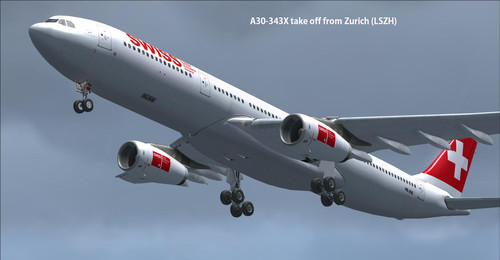
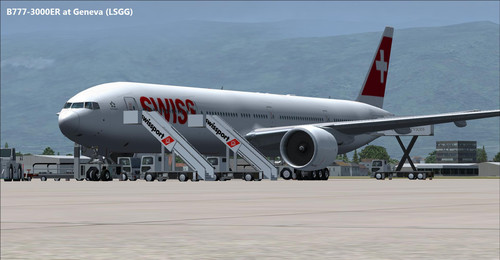
Here the Swiss International Air Lines fleet for FSX, FSX-Steam Edition, Prepar3D v1, v2 and v3. Complete pack with the majority of airplane from the real fleet as of June 2016. Some aircraft are no longer part of the fleet but represent a historic moment, they are offered as a bonus.

Each plane has a FMC (accessible from the simulator taskbar), GPWS (automatically activated) and a ground handling system (RCB), unique sounds and more.

Swiss International Air Lines AG (short Swiss, stylized as SWISS) is the flag carrier airline of Switzerland operating scheduled services in Europe and to North America, South America, Africa and Asia. Its main hub is Zurich Airport, with a focus city operation at Geneva Airport. The airline was formed after the 2002 bankruptcy of Swissair, Switzerland's former flag carrier.

Swiss is a member of the Star Alliance. It is a subsidiary of the Lufthansa Group, with headquarters at EuroAirport Basel-Mulhouse-Freiburg near Basel, Switzerland, and an office at Zurich Airport in Kloten, Switzerland. The company's registered office is in Basel. The airline uses the IATA Code LX that it inherited from the Swiss regional airline Crossair (Swissair's code was SR). The ICAO code is SWR, inherited from Swissair (Crossair's was CRX), in order to keep international traffic rights. (Wikipedia)


List of airplane

Airbus A319-112
Airbus A320-214
Airbus A320-214 (Sharklets) No VC
Airbus A321-212
Airbus A330-343X
Airbus A340-313X
Boeing B777-3DEER (VC compatibility issue with P3D v2 and v3 only)
BAe Avro RJ100 (VC compatibility issue with P3D v2 and v3 only)
Embraer ERJ-145LU
McDonnell Douglas DC-10-30
McDonnell Douglas MD-11 F
McDonnell Douglas MD-11 F No VC
McDonnell Douglas MD-83
Saab 2000 No VC
Donate Me